
NeuraTiM Stock&Find
Know what you have, and where to find it.
A simple home inventory for what you own, where you keep it and what needs replacing. Free to use, with offline inventory management and no account required.
- What is it?
- How many do I have?
- Where is it?
How it works
Add it in seconds. Find it when you need it.
No lengthy setup or import required. Start with one thing you would like to find again.
Step 1
Add what you have
Scan a barcode or enter a name. Choose a consumable or a belonging, enter the quantity and optionally a place. Photos, expiry dates and notes have their own tabs.
Step 2
Find it again
Search by name, barcode, note or place, then apply a filter. Each result shows the quantity, location and any restocking or expiry status.
Step 3
Buy only what is missing
Consumables below your chosen spare-stock level appear on the shopping list. Record what you actually bought to add it to storage; anything still missing stays on the list.
One item, two connected apps
Follow an item from shelf to shopping list and back.
Scan Vitamin D3 to add it, record the cabinet it lives in and its dates, then open a bottle, buy the next one and replace it. See how LifeCue keeps the dates in view.
All screens were captured from the running Flutter apps, not recreated in HTML.
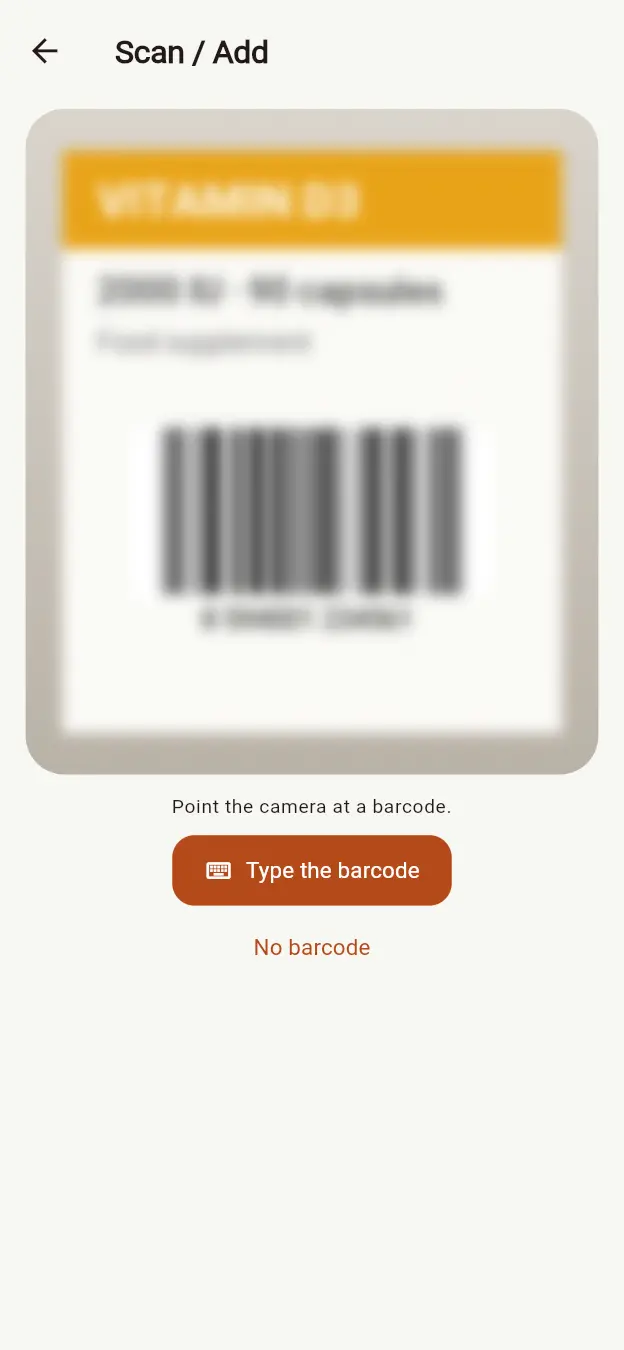
Tap Scan / Add and point the camera at the barcode on the bottle. No camera or no barcode? Choose Type the barcode, or add the item without a code.
Screen 1 of 23
- Tap Scan / Add and point the camera at the barcode on the bottle. No camera or no barcode? Choose Type the barcode, or add the item without a code.
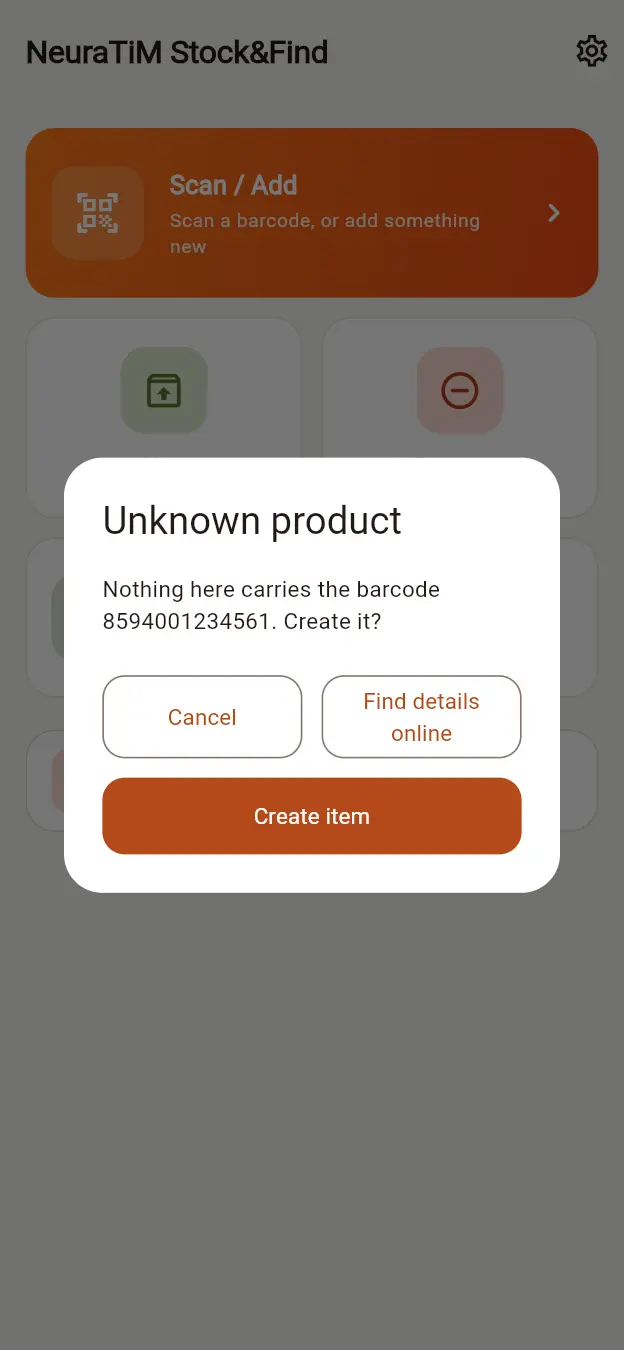
- Stock&Find reads 8594001234561. Nothing carries that code yet, so it offers to create the item.
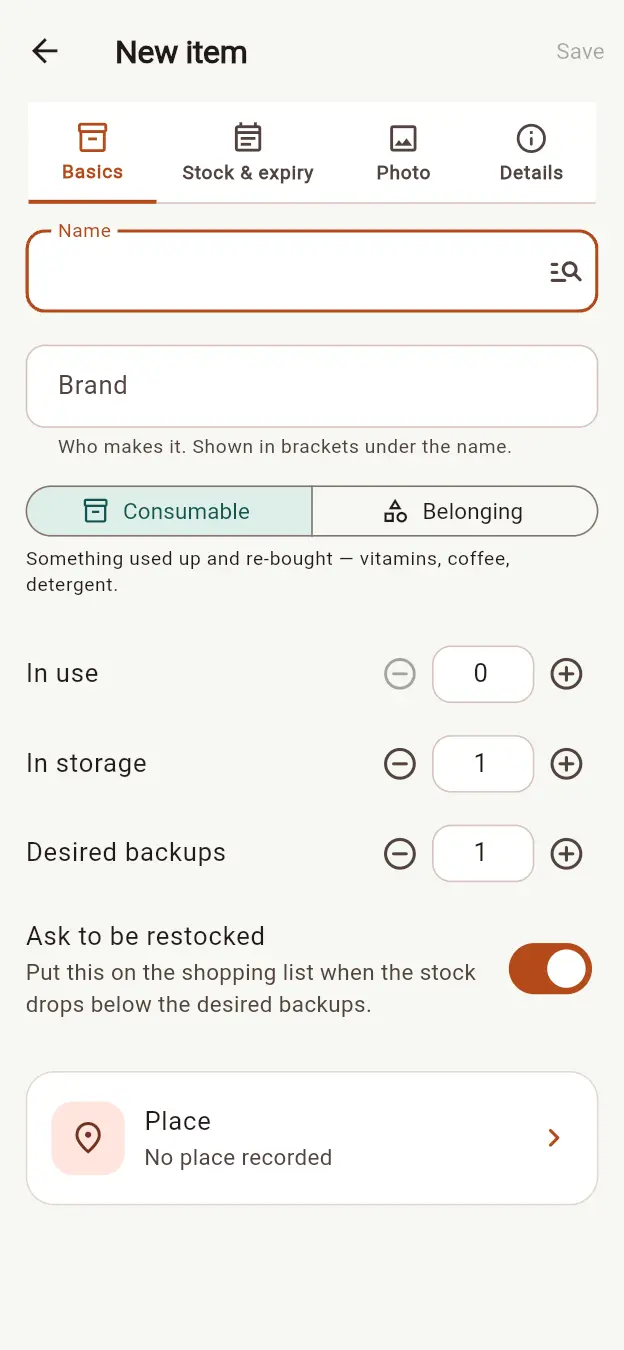
- Name it Vitamin D3. Keep Consumable selected and set both In storage and Desired backups to two bottles.
- Open the place picker and choose New place.
- Save Bathroom cabinet. The place now shows on the item, beside the two bottles in storage.
- Add an expiry date using the date picker. This example starts with 21 August.
- Give one unit the date 21 August and the other 28 August. The editor highlights which to use first.
- Save the item. The home screen shows two units in storage, their location and an Expiring soon status.
- When you open a new bottle, choose Use from Storage and scan it. Without a camera, choose Type the barcode or Find by name.
- The units have different dates, so Stock&Find asks which you are taking and suggests 21 August.
- The selected unit moves into use. Only one spare remains, so one replacement is added to the shopping list automatically.
- One bottle is open and only one spare is left, so the shopping list asks for one Vitamin D3 and shows what is in use and in storage.
- Tap the round tick on the card's corner when you buy it. The unit goes straight into storage, the list is empty, and Undo can reverse it.
- After 21 August, the home screen flags one unit as Expired and still shows its location and quantities.
- Open Expired to see Vitamin D3, its recorded date and the option to dispose of one unit.
- Dispose of that unit. Stock&Find records the removal, offers Undo and adds a replacement to the shopping list.
- To open the next bottle, choose Use from Storage again. This time choose Find by name — the same search as Browse — and select Vitamin D3.
- A unit is already open, so the app asks whether to replace it or open another alongside it.
- Choose Replace the open one. The replacement is now in use, storage is empty and the shopping list reflects the missing spares.
- In LifeCue, the Stock&Find connection shows the linked space, the last data received and how the one-way transfer works.
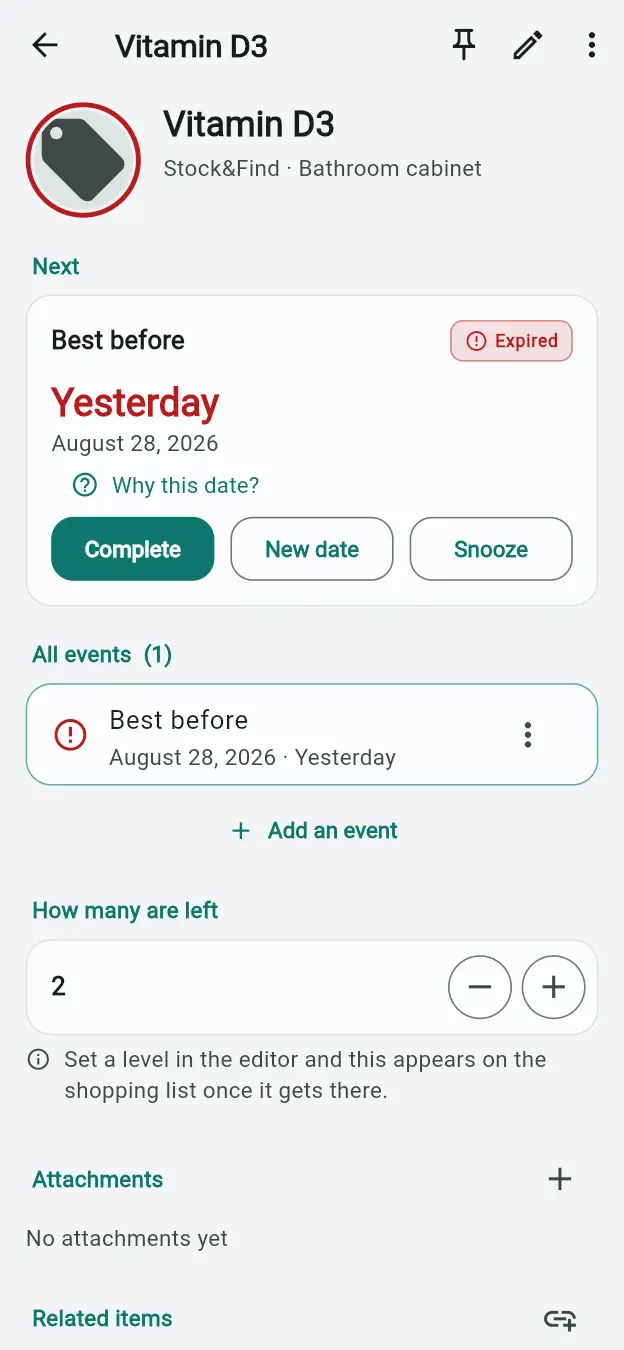
- After 28 August, LifeCue shows Vitamin D3 as Expired in the Stock&Find space on its Today screen.
- Open Items in LifeCue to search, filter and sort the imported record by location, quantity and date.
- Open the item details to see the best-before event, time since expiry, quantity, location and Stock&Find reference together.
Restocking
Choose your spare-stock level. Let the list do the counting.
The app keeps units in use separate from units in storage. When storage falls below your desired spares, the difference goes on the shopping list automatically.
An open unit is not a spare
One jar open and two in the cupboard means two spares. With a target of three spares, you need to buy one, not zero.
Bought it? Add it straight to storage.
Mark a purchase to update storage in the same step. You can add an expiry date without entering the purchase again.
Buy some now, keep the rest on the list
Need three but only bought one? Record one purchase and the remaining two stay on your list. For a single unit, one tap is enough.
Turn off automatic restocking for individual items, or add a manual shopping entry without creating an inventory item.
Shopping assistant
Shop from the list. Stock changes when it arrives.
Shop now turns the shopping list into a draft order — one card per item, grouped by shop. Every edit is saved as you go, so you can close the app in the middle of a store and carry on later.
Step 1
Start from the shopping list
Everything below its desired backups is already on the list, with how many to buy. Tap Shop now and the assistant opens with exactly those items.
Step 2
Fill in what you buy
Each card shows what is in use, in storage and still to buy. Set the quantity, the price and a shop link; links group the cards by shop. The + beside the title adds something the list did not ask for.
Step 3
Tick, finish, receive
Tick what you ordered and tap Done shopping. Orders wait under On the way until you mark them received — only then does the stock go up, and anything that did not come stays on the list.
Shop and bring it home
Link Checklist once. The list stays in sync by itself.
NeuraTiM Checklist is for ticking things off in the shop. Press Link Checklist on the shopping list once; from then on both apps read and write the same list on your phone.
One press, then automatic
Whatever runs low appears in Checklist, and what you tick there comes back to Stock&Find — nothing to send, nothing to paste. The link icon shows the two apps are connected.
Bought counts exactly once
Each line remembers how many were asked for, bought and already added to storage, so stock never goes up twice, and unticking a mistake takes it back off. A partial purchase stays on the list until the rest is bought.
Dates and history come along
An expiry date can travel with each bought unit into storage. Finished lines stay beside the list for two days, then in the history until day seven. Disabled items are never shared.
The two apps share the list on the same phone through the system's own app-to-app storage. Nothing goes to a server. If Checklist is not installed, the link button offers to download it.
Places
A place for everything, in your own words.
A place can be a box, drawer, shelf, cellar or car. Add it on its own or inside another place. Locations are optional, but they make “Where is it?” easy to answer.
Nest places when it helps
Create Cellar → Shelf → Camping box, or keep a simple flat list. An item's details show its full location path.
One photo for the whole place
Photograph a box once so you can recognise it later. Open the place to see its items and quantities.
Move one item or several
Change an item's place from its details, or select several in Browse and move them together. Each move is recorded in the item's history.
Features
Keep track of your things, not paperwork.
Four actions, one screen
Scan / Add, Use from Storage, Remove from Storage and Browse / Search, with your shopping list just below. Everyday actions are right where you need them.
Consumables and belongings
Track open and spare units of things you use up, or the quantity and location of belongings you keep. Adding, removing, moving and correcting follow the same rules.
Open does not mean used up
Return an unfinished unit to storage or mark it as used up. Both actions offer Undo, and its expiry date stays with it when it moves.
Use the right unit first
When stored units have different dates, choose which one to use. The app suggests the earliest date that has not passed. With one date or none, a single tap is enough.
A shopping list that keeps up
Set how many spare units you want. When storage falls below that number, the missing quantity appears on your shopping list. Mark a purchase to add it to storage.
Scan a code or type it
Supports EAN-13, EAN-8, UPC-A, UPC-E, Code 128 and QR. A saved code offers Add, Use, Remove or Open; a new code offers to create an item. Manual entry is always available.
More than a product number
Equivalent UPC-A and EAN-13 codes identify the same product. Check digits are verified. GS1 labels can supply the product number, batch, serial number, net content and expiry date; you review the date before applying it.
Places you can recognise
Name a box, drawer, shelf or cellar, and optionally put one place inside another. Add a photo to the place once, rather than to every item inside it.
Your photo, your framing
Drag and zoom to frame each photo before saving. Every photo uses the same 3:2 shape, so the saved crop matches the preview.
Tags that fit your life
Give each item one category and as many tags as you need: camping, first aid, Anna's things. Existing tags appear as suggestions, making them easy to reuse.
One filter, with search on top
Filter by use, item type, restocking, expiry, missing location, category or tag. Selecting a filter replaces the previous one; search narrows the results further.
Know why the count changed
Every addition, use, removal, move and correction gets a history entry. Removal reasons are optional. Corrections add an entry instead of rewriting the past.
Expiry dates when you need them
Add dates to individual units, check Expiring soon or Expired, and include them in your daily reminder. Leave dates blank for things that do not need them.
One daily reminder, off by default
Turn on a daily summary of low stock and upcoming expiry dates. No separate alert for every item or stock change.
One file for your backup
Export items, places, categories, history and photos together. Restore by merging or replacing; merging the same backup again does not create duplicates.
Online only by choice
Three optional searches. All off by default.
Your inventory works offline. You can enable online searches for product details, names or pictures. Each explains what it sends.
Product details from open catalogues
Look up products online queries Open Food Facts and related catalogues, or Open Library for books. It sends the barcode, not your stock quantities, locations or notes.
Choose what to keep
Review the name, photo, brand, size and category before saving. Fields that would replace existing content start unselected. Undo reverses the whole update.
Find a picture by name
Find pictures by name searches Wikimedia Commons and Openverse using the words you enter. Each result shows its licence information.
Find product names online searches by barcode, or by the words you enter when there is no code. All three search settings stay as you left them after restarting. Sending feedback also uses the network when you choose to submit it.
Privacy
Your inventory stays yours.
Stock&Find needs no account and does not upload your inventory to a central database. Optional searches and sharing are your choice, not a condition of using the app.
- No account or sign-in
- No analytics, trackers or advertising SDKs in the app
- No central server storing your inventory
- Item and place photos are saved locally
- Online searches are off until you enable them
- Send your shopping list to Checklist on the same phone
Stored on your device
Your inventory is stored on your device. You decide what to export or share.
Your data
Easy to back up. Yours to delete.
Before you export, the backup screen explains what the file contains. You choose its destination. Deleting data requires confirmation, so you know what will be removed.
Everything in one file
Items, places, categories, history and photos travel together. Choose where to save the file; no cloud account is required.
Restore without duplicates
Merge a backup with your current data, or replace your current data with the backup. Merging the same file again does not create duplicate records.
Know what you are deleting
The confirmation lists the inventory data that will be removed from the device and suggests exporting a backup first.
Put an item aside without deleting it
Archive an item to hide it from active lists while keeping its quantity and history. Restore it whenever you need it again.
Backups are not encrypted. Store and share them carefully: anyone with access to the file can read your inventory.
Free, with optional support
Completely free. No catch.
Every feature is free on every platform. Donations are optional and never unlock extra features.
I cover the development and running costs, including hosting and Apple's annual developer membership. If Stock&Find has saved you from buying something you already had, a small tip helps. Always appreciated, never required.
Leave a tip
Other ways to support the project:
Prefer email? Send a tip
Get the app
At home on your phone and in your browser.
Release builds are generated automatically from the source code. Availability and installation options vary by platform.
Android
In closed testing on Google Play. Join the tester list and it installs like any other app.